


Denti.AI Scribe simplifies note-taking by transcribing patient-clinician conversations in real-time, generating structured clinical notes tailored to your workflow. Enjoy thorough, accurate, and seamless documentation.


Select a template or create your own.

Let Denti.AI Scribe capture the visit.

Review summary and make edits if needed.

Append notes effortlessly anytime.

Save instantly to your PMS*, keeping records consistent.
Book a free demo to see how Denti.AI Scribe can streamline your workflow and enhance patient care.

Speak naturally and let our advanced AI convert every patient-provider conversation into precise, template-ready clinical notes. HIPAA-secure, fully customizable, and compatible with any microphone – even the one built into your iOS device. Focus on patients, not paperwork.
.png)

DentiAI's Scribe software has been a game-changer for me. My staff is now "hands-free" during exams and can work on other charting, treatment planning or even have a chance to go to the bathroom (winning!) while I chart verbally to the system. The countless hours I save now because I don't have to tediously document long conversations, patient questions and limited exams is worth every effort to integrate!


The staff and I are absolutely loving Denti AI Scribe! We are glad that we made this choice.

The major benefit to Denti.Ai vs. the competitors is the complete granular control over the templates and the prompts, which is perfect for providers who are very particular about their clinical notes.

I would never go back to writing a chart note. Denti.AI picked up everything and was easy to use. The team loves it!

Scribe is loved in the offices!

The accuracy of Denti.Ai Scribe is very good and it has ambient listening mode to record during the appointment, which many of the competitors don't even have. Without ambient mode, you have to try to remember all of the appointment details when you get around to dictating the notes, which is not very reliable.
Denti.AI has made our schedule run even smoother since our assistants aren't so bogged down with the note portion of the appointments!

Love it! Mobile Apps is great if the computer is down.

Denti.AI has provided us with stellar support. This has been a key reason we decided to work with them.

Our notes are dramatically more accurate, more detailed, and more extensive notes.

Hannah made setting up all stations a breeze! The clinical team is just starting to use the software but so far nothing but good things. This is definitely going to make our lives so much easier!

We trained the team Friday afternoon, and everyone is using Scribe today. I have heard positive feedback from the team. I appreciate how easy you made this for me.

Your team has stepped up to the plate and exceeded expectations. The support and smooth rollout have been great and productive.

Referral letters is the MOST valuable part for me — nobody is doing this from a comprehensive care standpoint. Taking care of the clinical note, visit summary, referral letter and more, all generated from a single conversation, is HUGE. Major value add.

We're incredibly pleased. From our first interactions with the sales rep to installation and execution — we're thrilled with how easy the software is and how much time it's already saving us!

From the software to the customer service, DentiAI is wonderful and has been the best addition to our practice!
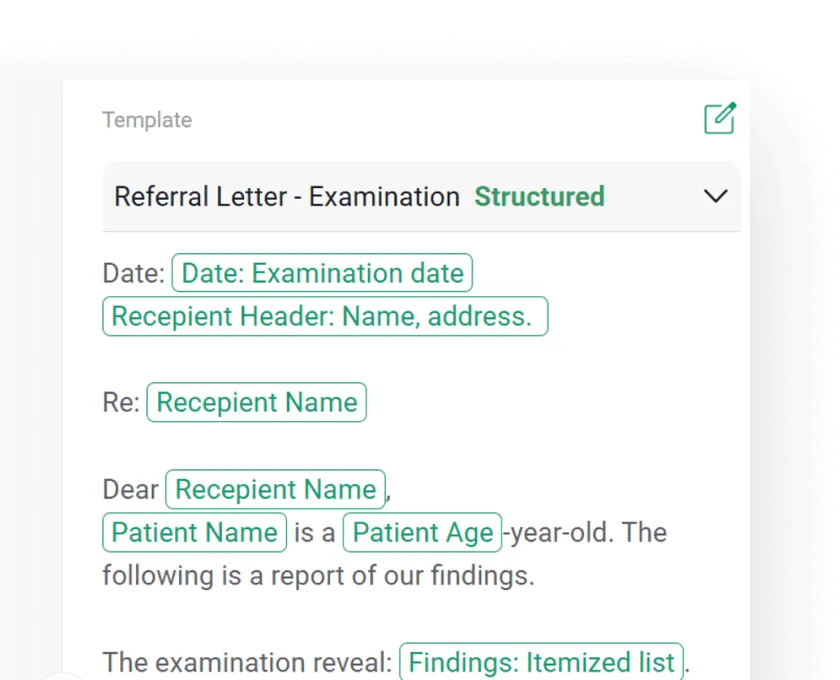
Easily generate referral letters from one dental professional to another. Auto-fill patient history, treatment needs, and diagnostic findings in a structured format.
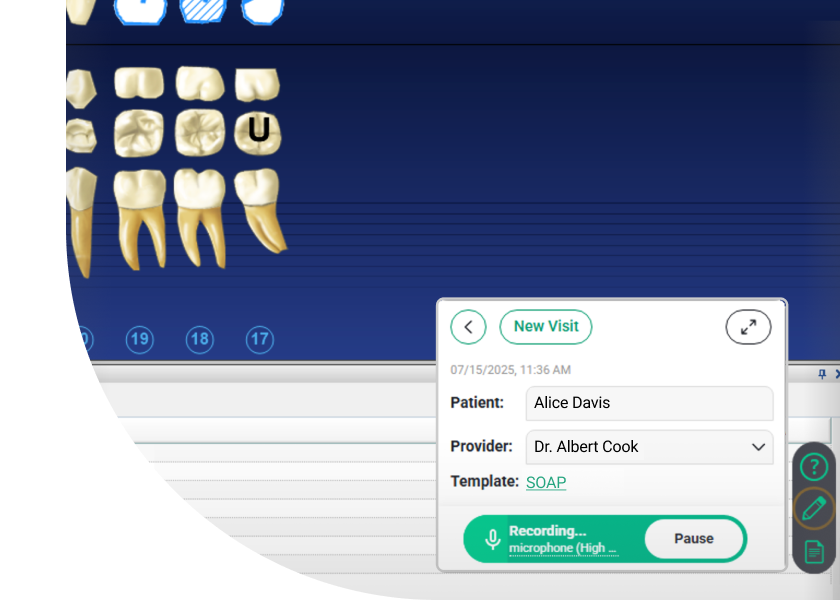
Shrink the app window to keep Scribe listening and capturing notes in the background, so you can view other systems without disruption. Expand to Full Scribe at any time.
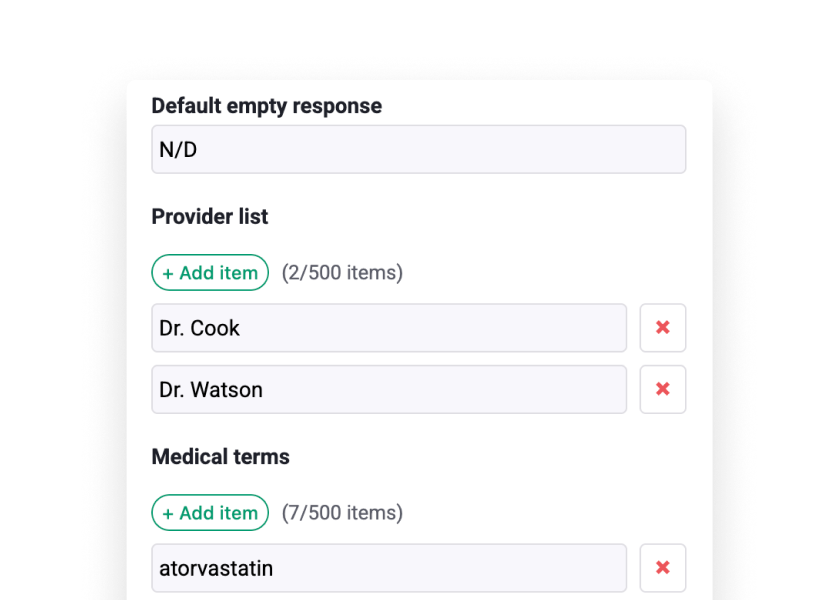
Customize medical terms, provider lists, and prompts at the DSO or location level to standardize notes and speed up documentation for every team.


Denti.AI Scribe works with any standard microphone, so you can get started right away with the equipment you already have. For the best experience and optimal accuracy, we do offer a recommended microphone—but it’s not required to begin using the software.
Yes, Denti.AI Scribe integrates with most major PMS systems.
Minimal setup time, with intuitive features designed for immediate use.
An AI dental scribe listens to clinician-patient conversations during visits and automatically generates structured clinical notes. It replaces manual typing and dictation, saving dentists 1-2 hours of documentation time per day while capturing clinical details accurately.
During a patient visit, Denti.AI Scribe captures each speaker in real time through a microphone, identifies the chief complaint, exam findings, treatment plan, and more, and populates a SOAP or custom template instantly. The context-aware AI filters out small talk and delivers a ready-to-sign clinical note. Notes save directly to Dentrix, Eaglesoft, Open Dental, or another PMS with one click. There’s also a Mini-Scribe mode that shrinks the app to run in the background while you use other systems.
Yes. Denti.AI Scribe is fully HIPAA compliant. Patient data is encrypted in transit and at rest, processed on secure cloud infrastructure, and handled according to healthcare data protection standards. The platform is designed for clinical environments where patient privacy is paramount.
Denti.AI Scribe integrates directly with Dentrix, Dentrix Ascend, Eaglesoft, Open Dental, Denticon, CareStack, ClearDent, ABELDent, Curve Dental, Oryx, and others. Completed notes save directly into the patient’s chart — no copy-paste required.
Yes. Denti.AI Scribe offers customizable templates for different visit types — comprehensive exams, hygiene visits, emergency visits, consultations, and more. DSOs can also configure dictionary customization at both the organization and location level to standardize documentation across all practices. You set your preferred format, and the AI structures every note to match.
Yes. Denti.AI Scribe uses multi-speaker capture to distinguish between the hygienist, assistant, treatment provider, and patient during a visit. It creates structured clinical notes from these conversations, attributing findings and discussions correctly. It also auto-generates referral letters from the captured clinical data when you need to refer a patient to a specialist.
Yes. Denti.AI Scribe is available as an iOS app for iPhone and iPad, in addition to desktop and web versions. You can start a recording chairside on your mobile device and review or finalize notes on any platform — everything stays in sync. There’s also a Mini-Scribe mode that shrinks the app window so you can keep it running in the background while viewing other systems.
Find Denti.AI Scribe and microphone installation guides in our Help Center.